Summary
Role
lead designer, in collaboration with a senior designer and a product manager, with the support from the UX leader, a senior researcher, and 2 senior engineers.
Target Users
Contingent Program Specialist
Design Problem
Data Hygiene, Data Privacy, & System Explanability
Context
In a workforce management system, for many reasons, it is common to have many candidate profiles pointing toward the same person. Workday VNDLY has the capability to catch the duplicate profiles and put up static flags on the profiles to inform end-users. However, program specialists need a space to actually manage all the candidate profiles.
In order to meet that need, a design first and foremost must be able to explain clearly why the system “thinks” these profiles are pointing toward the same person. Secondly, the contingent staffing process involves multiple parties; each profile can have significantly different information, depending on which project it is associated with. Therefore, the design has to scale appropriately to show or hide candidate data based on user permissions. Allowing users to customize what data they want to see in a given moment to complete their jobs-to-be-done was also a requirement.
Design Process
Identify Workflow Requirements
Through research, the top 2 common use cases for a unified candidate management system were:
- to review and confirm the flags put up by the system (because system is not always right)
- to have a combined view of the all work histories and performances of a person
In order to create a cohesive experience, the design goal was to empower users to make decisions by explaining system behaviors and providing users with tools to resolve the flags. And to enable other designers to contribute ideas, I abstracted the product requirements into design problems, describing what components and patterns needed.
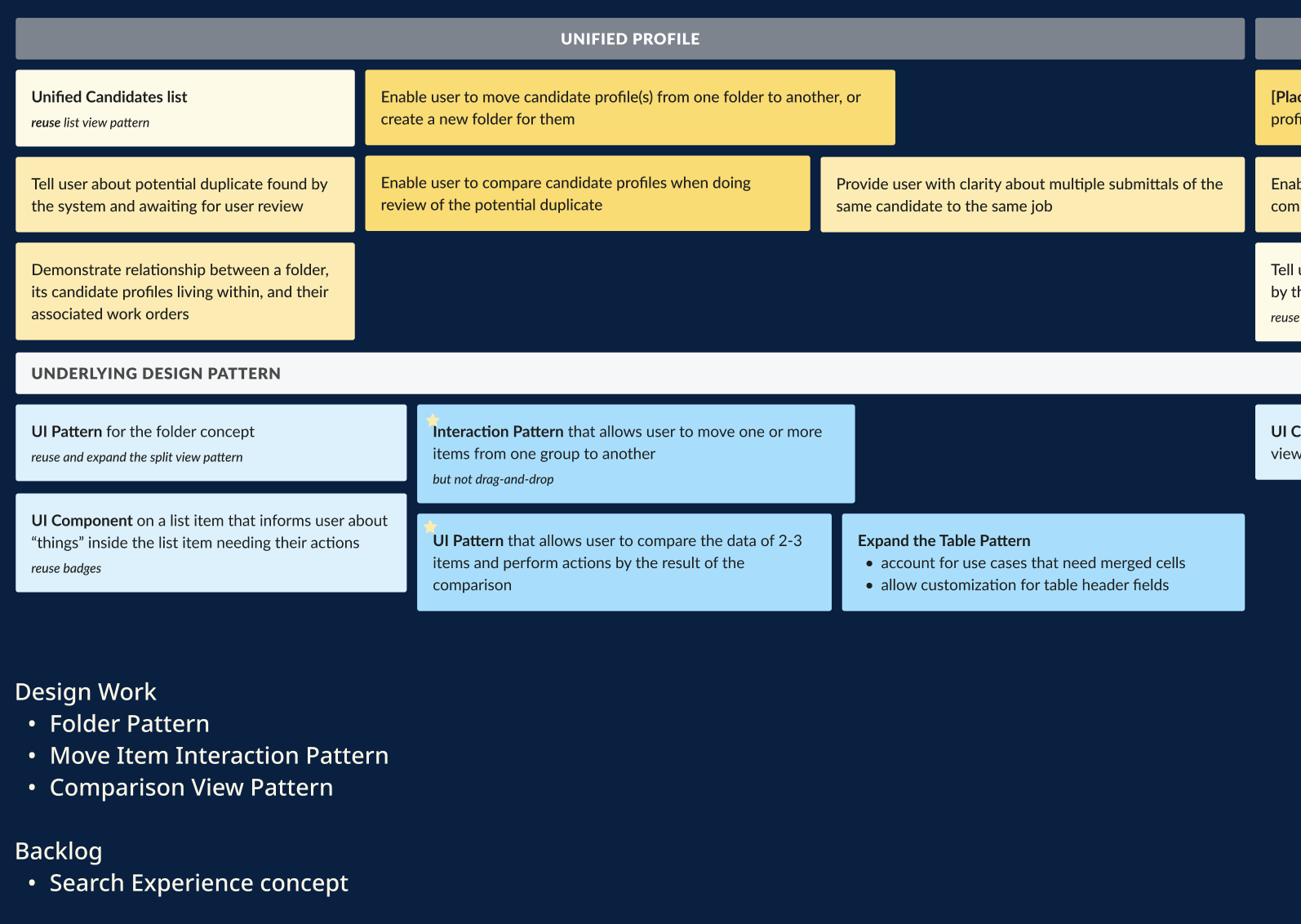
THE Design Workplan
abstracted design problems. The top part (yellow) describes functional design requirements, the lower part (blue) describes design patterns needed. This approach ensures consistency, reusability, and scalability of the designs, as there were other areas sharing these needs across the platform.
I identified that the workflow must have indicators to tell users which profiles might need their attention and progressively guide users to go through the process of confirming the flags. In order to achieve the requirement of “progressive disclosure,” I allowed users to take simple actions with minimal amounts of candidate information at the early stages of the workflow. When the situations got more complex, I provided users with an option to dive deeper and access more advanced tools.
This approach helped users navigate through the workflow effectively—with a gradual increase in cognitive load.
Decide on The Concepts
The key foundation here is that a Unified Profile is a container of many Candidate Profiles that are representing the same person. It has a minimal amount of unique attributes, but rather shares attributes with its child profiles and has data values re-calculated accordingly.
This characteristic created lots of challenges in designing an information hierarchy that could clearly illustrate the relationship between different objects, and map them with appropriate actions. After doing pattern analysis and being inspired by the computer directory, I landed on this folder concept for the first view of the workflow.
(Of course there were 4-5 other concepts that I did throw away before getting here. The Research process might show this aspect a bit more, in case you want to check it out.)
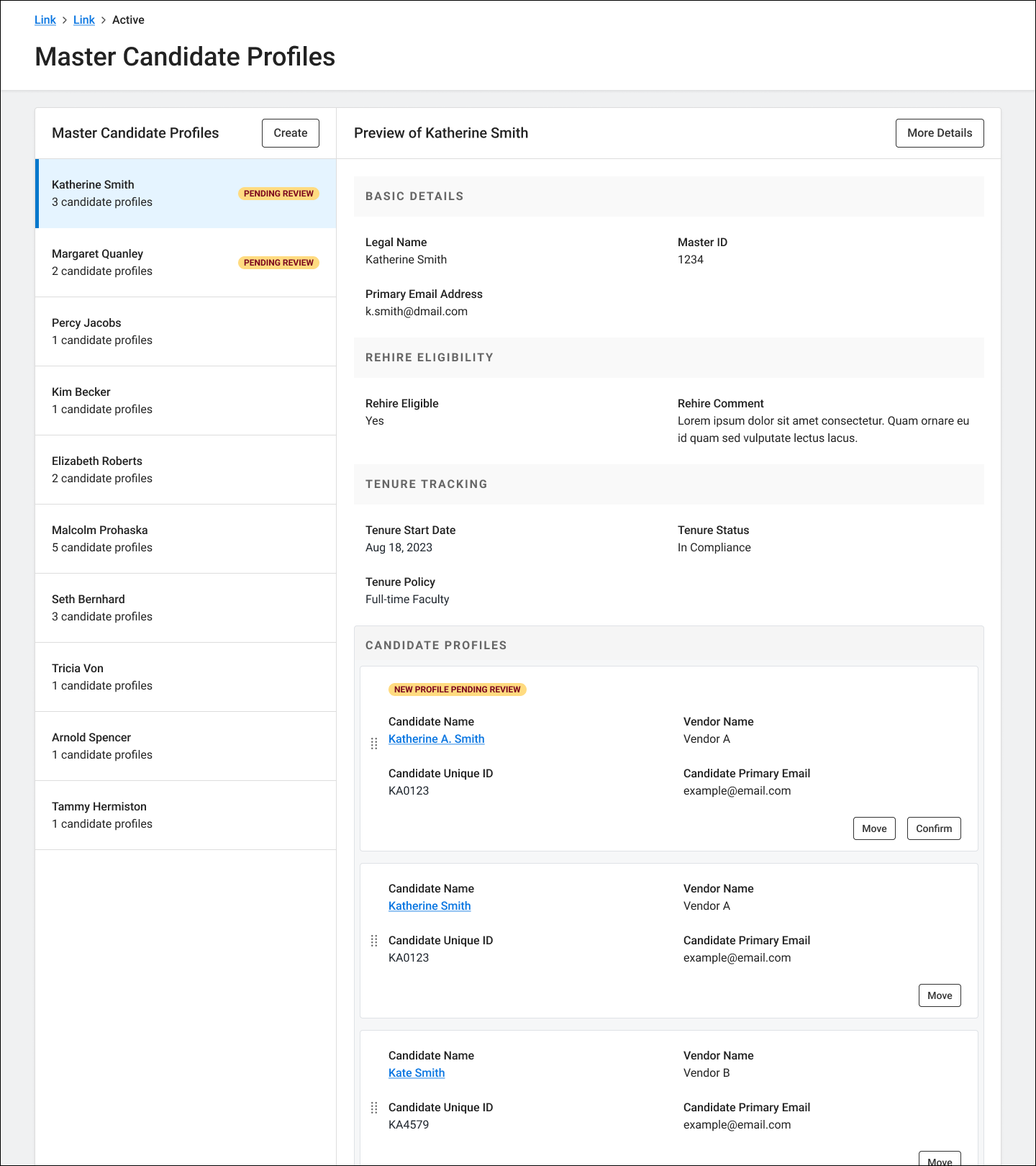
THE Folder V.1
This UI has a list of “folders” on the left-hand side, with “folder details” and child profiles on the right-hand side. It has the “Pending Review” badge to indicate new duplicate profiles found by the system, awaiting for users to confirm. The UI has a drag-and-drop interaction to allow users to move a candidate profile to a different folder.
From this point, recognizing there is one or more candidate profiles pending for review, users can agree or disagree with the system. If they agree, go ahead and confirm this is the right folder. If they disagree, they can move the profile(s) to a different folder.
Through concept testing, we have learned about a user behavior: once a user feels suspicious about or disagrees with a flag, they will investigate the profiles very carefully, so that they can minimize the downstream impacts. In those cases, users need to pull in lots of data points to make cross-references. And as my goal was to create a seamless experience, making users navigate away from the space, to get more details on individual profiles, was not an ideal option.
Therefore, as part of the “Move” workflow, I enabled users to compare different candidate profiles and select the criteria they might need to make a decision. The initial ideas for the Comparison View were similar to those “Compare Products” screens on e-commerce websites. However, after considering user needs (large amount of profiles and data attributes to be added to the view), and the target user’s working environment (mostly around dashboards and excel sheets), I decided to use a table component.
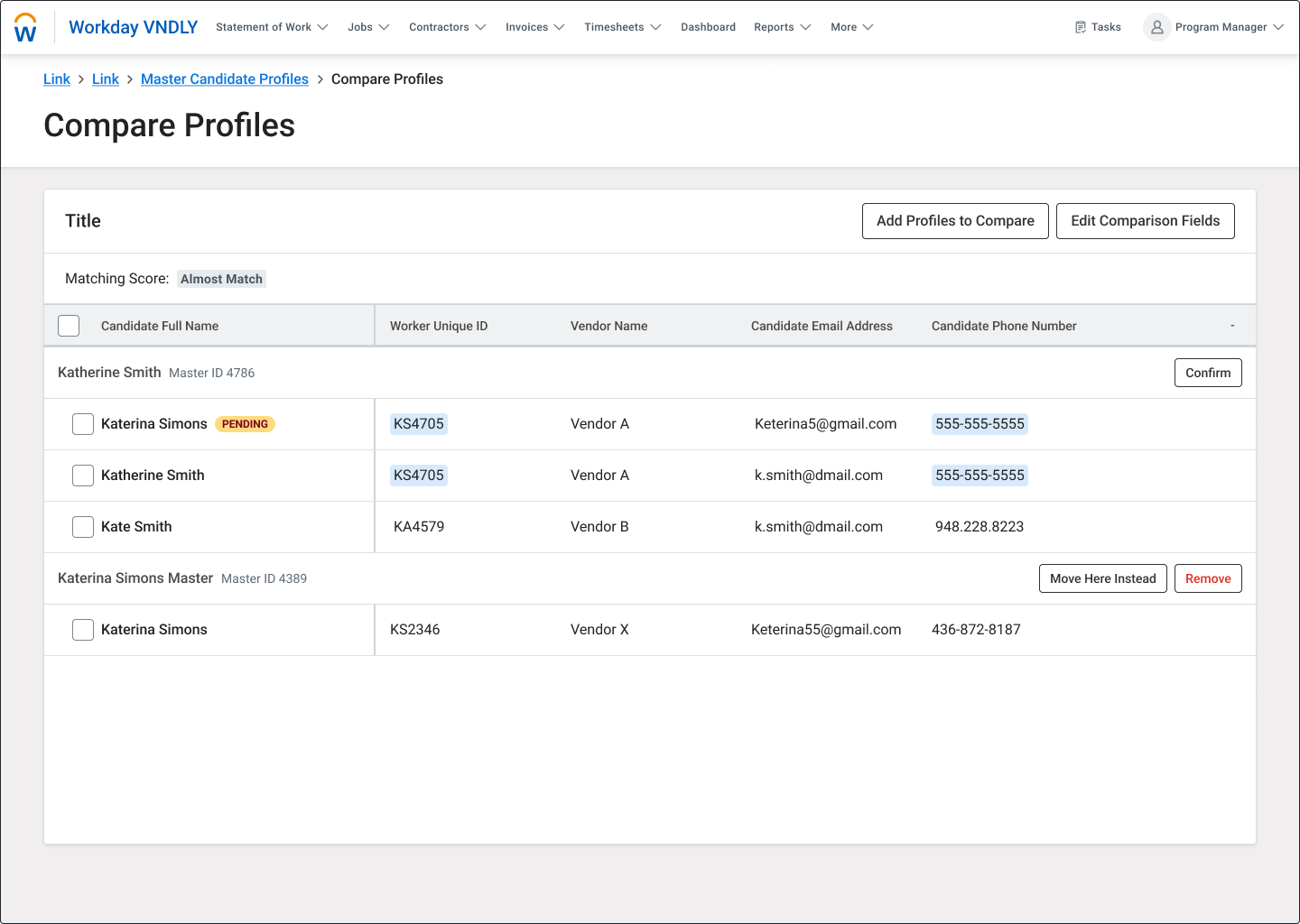
THE Table V.1
This UI is a nested table, with the parent rows being the “folders” and nested rows being child profiles. The system runs checks and highlights matched information across profiles. This helps users quickly recognize the similarities among the profiles being compared. The UI allows users to modify data columns and add more candidate profiles to make comparisons.
The “Matching Score” concept on this view sparked exciting conversations, among the engineers, around an optimal search algorithm. We even went further to discuss a probabilistic approach to improve system performance and increase the chance of catching duplicate instances.
These technical conversations (coincidentally) aligned perfectly with a recommendation I made for Products when sharing out the research, as illustrated by the following graph. They were also proof that (1) engineers could be open to innovation & novel ideas, and (2) (good) design concepts could help create the bond between designers and engineers.
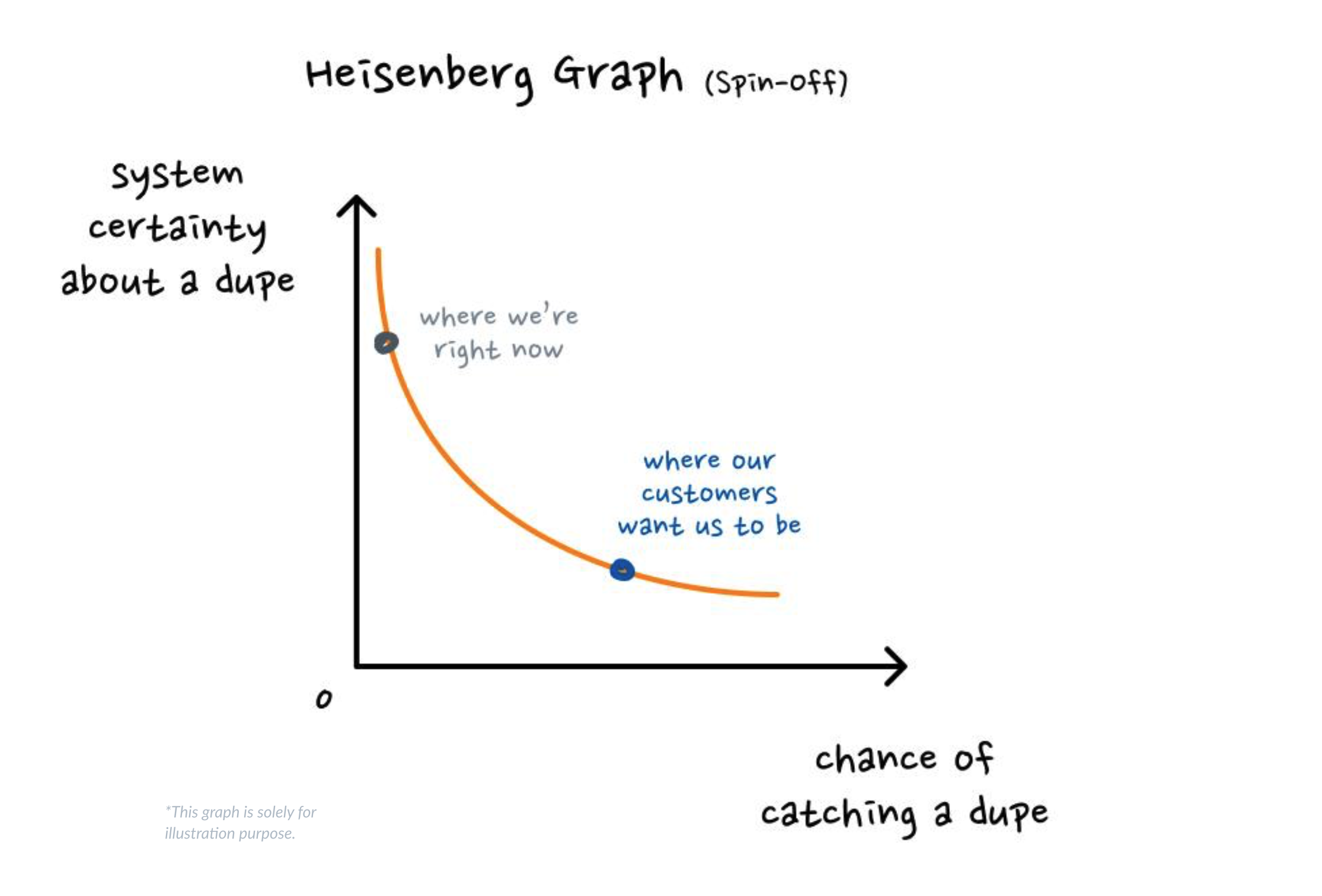
THE Heisenberg Graph
This graph is pointing out how reducing system certainty (which I have learned later was “deterministic”) could help increase the chance of catching duplicate profiles.
Bring The Workflow Together
By connecting the requirements and the “keyframes,” I brought to life the Candidate Management system. As illustrated in the following workflow, a program specialist user can view candidate “folders” with profiles inside; when there is a duplicate flag, a user has options to confirm the flag, or disagree with the flag and initiate the flow to move the profile to the right folder. After confirming their choice, there is feedback from the system to inform the user that actions are successful and the folder data is updated.
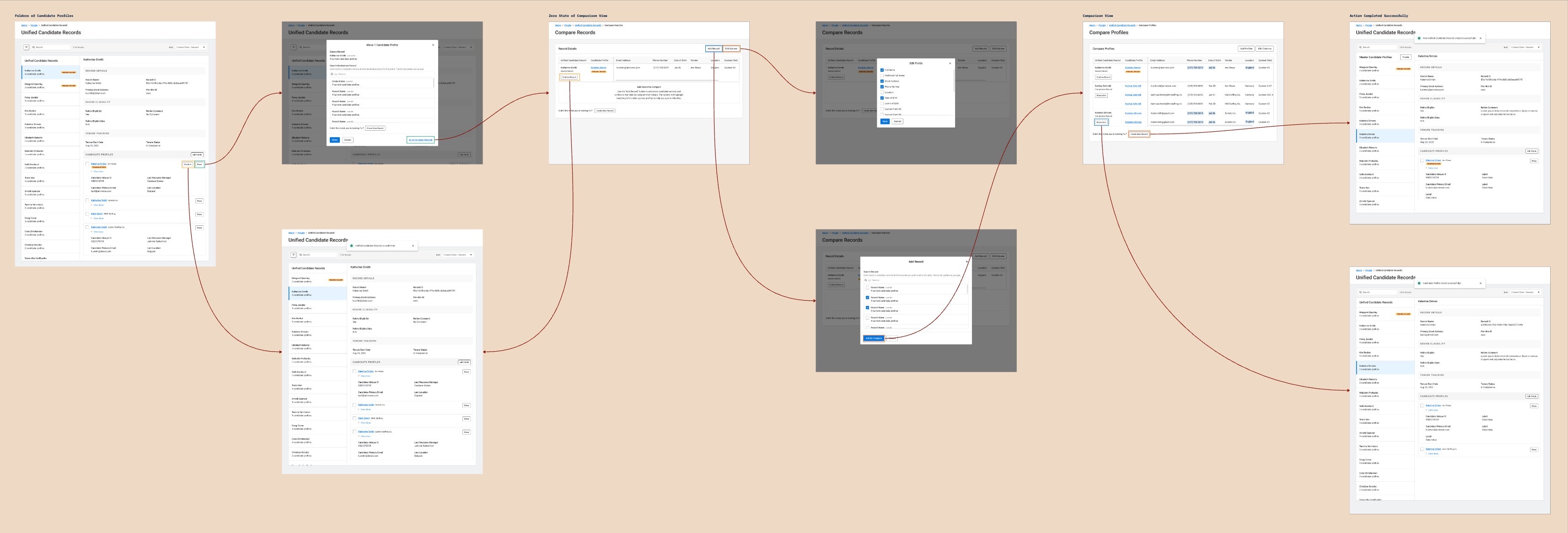
THE FLOW
Similar to the animation production, when having the keyframes, I filled out the workflow with inbetweens: a modal that allows users to select a target to compare against, the zero-state of the comparison view, and success screens.
Recognizing I was introducing new design concepts and patterns, I reached out to the Accessibilities team to request a design review. The design was flagged for a dozen accessibility issues, such as: drag-and-drop interaction on the Folder concept, lack of zero-state of the Comparison view, and inaccessible table design.
I worked closely with the Accessible Design Specialist to go through the issues and addressed them carefully. We finally landed on the final version!
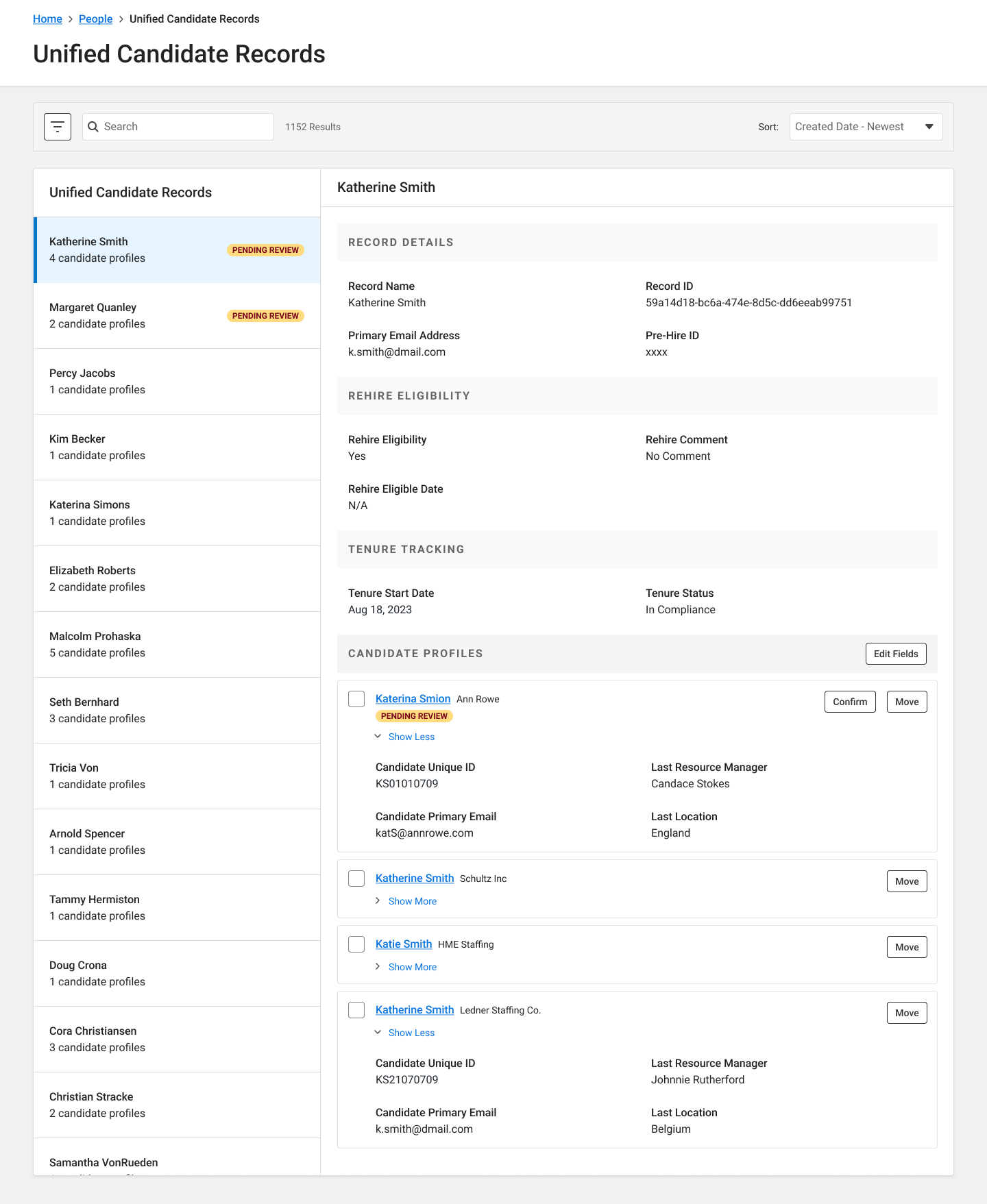
THE Folder V.2
This version removes the drag-and-drop interaction and enhances the affordances to comply with accessibility requirements. It also has improved visual hierarchy in the Candidate Profiles section, by breaking up the candidate names with other data attributes, to strengthen the relationship between objects.
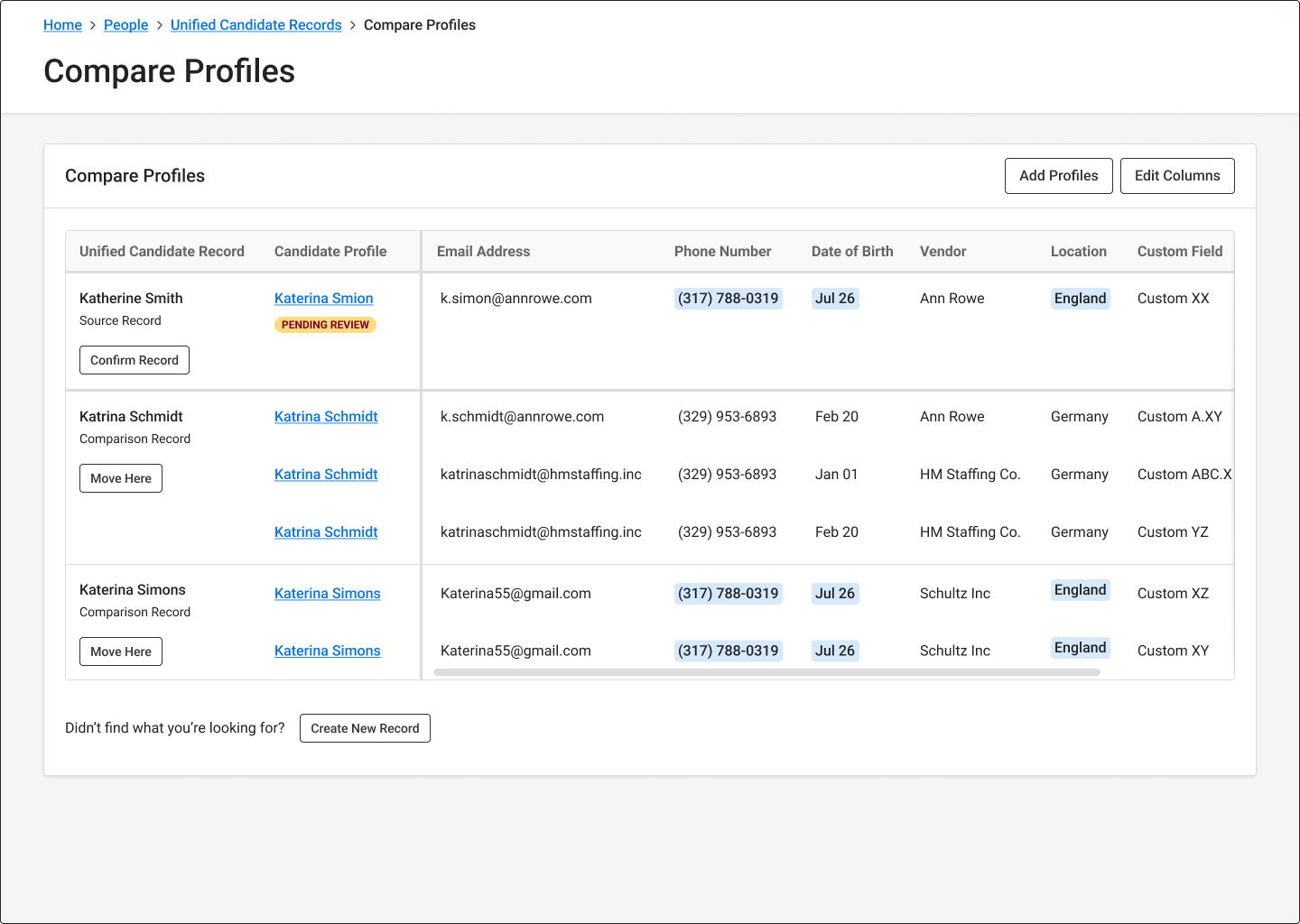
THE Table V.2
Moving away from nested tables for accessibility reasons, this table has a merged-cell structure and clear constraints on sticky columns & rows.